

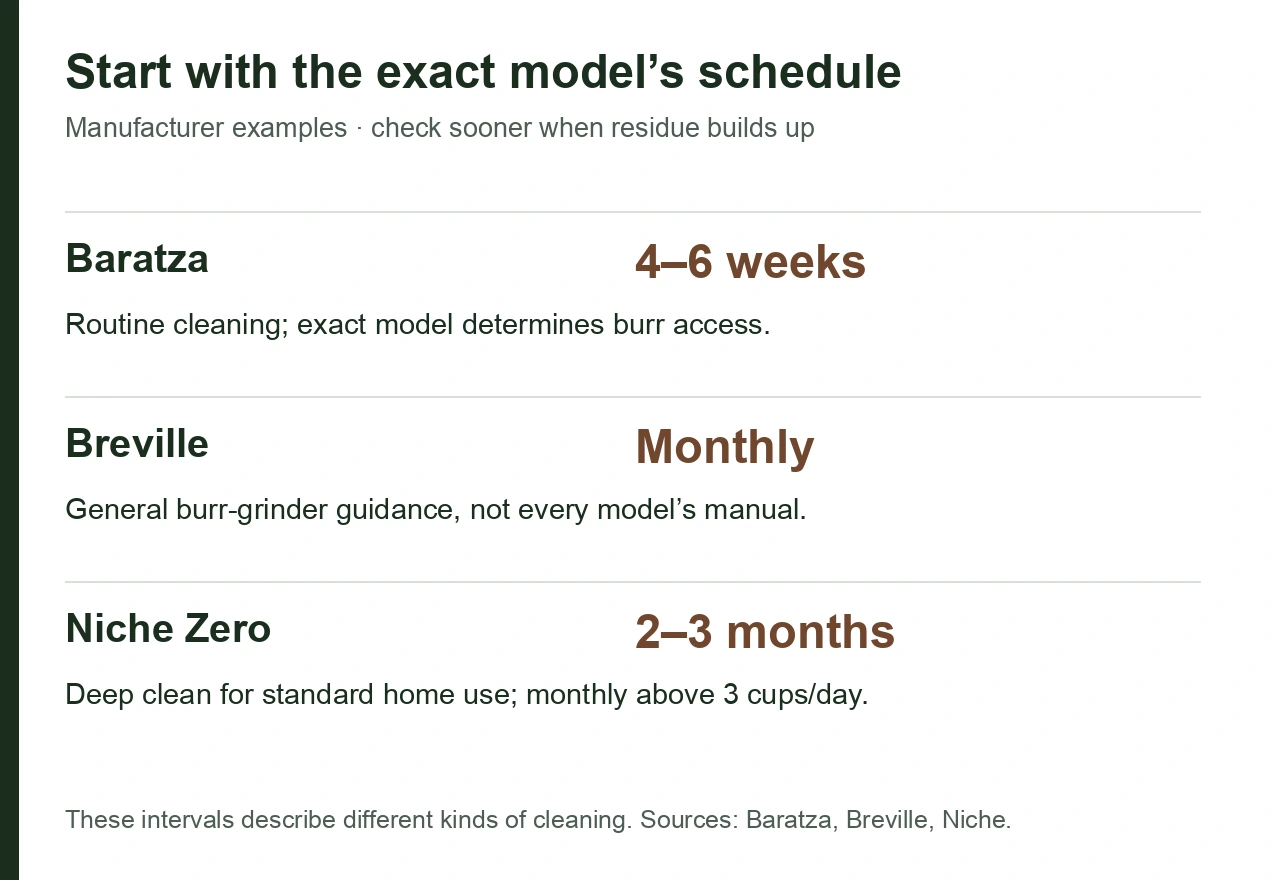
Baratza recommends routine grinder cleaning every 4–6 weeks, while Breville’s general burr-grinder guide recommends monthly cleaning. Use these as starting points only when they fit your model: the kind of cleaning, daily use and coffee all affect the interval.
Your exact grinder manual wins when it gives a different schedule, and visible buildup can justify cleaning sooner. If the grinder stalls or makes an unusual noise, stop and unplug it before following its troubleshooting instructions.

What makes one grinder need cleaning sooner than another?
Coffee is not a dry, uniform material. Fine particles, oils and chaff collect in the grind chamber and exit path. Darker or oilier coffee can increase buildup, and very fine espresso settings can make packed coffee more likely to stay in a chute.
Daily volume also matters. A grinder used for one shot every morning does not accumulate residue at the same rate as one making multiple drinks throughout the day.
| Condition | Consider cleaning sooner when… |
|---|---|
| Dark or oily coffee | Oil film and sticky grounds become visible |
| Espresso-only use | Fine grounds collect in chute and chamber |
| Frequent bean switching | Old grounds carry into the next coffee |
| High daily volume | Residue builds faster |
| Long idle period | Old coffee has been sitting inside the grinder |
| Recent clog | Stop and unplug; follow the exact model’s clog-clearing instructions before restarting |
What should routine cleaning include?
Routine cleaning should remove accessible loose grounds without turning every maintenance session into a rebuild.

Check these points against your grinder’s instructions:
| Task | General rule |
|---|---|
| Power | Unplug before internal cleaning |
| Hopper / remaining beans | Empty or run out beans only as the manual instructs |
| Burr access | Remove only parts the exact model describes as user-serviceable |
| Dry residue | Brush or vacuum only where the manufacturer permits it |
| Washable bins / hoppers | Wash only materials the manual allows, then dry fully |
| Reassembly | Restore every part in the documented order |
| Calibration | Recalibrate only when the exact model requires it after cleaning or burr removal |
Do not copy a disassembly sequence from a different grinder because both use conical or flat burrs.
Do grinder burrs need water?
Keep burrs dry unless the exact model’s instructions explicitly say otherwise.
Niche tells Zero owners to keep the burrs dry and clean with a brush and dry cloth. Breville’s general grinder guidance also warns against soaking burrs or blades and notes the risk of rust if metal parts remain wet.
Some removable plastic hoppers and grounds bins can be washed. That does not mean the steel burr set belongs in the sink.
Should you use grinder cleaning tablets?
Only if your manufacturer permits them.
Baratza lists grinder cleaning tablets as an optional part of routine care for its grinders. Breville’s general guide also mentions purpose-made grinder cleaning tablets as an option.
Niche takes a different position for the Niche Zero: its current cleaning guide says cleaning products are not needed and recommends a brush and dry cloth instead.

Do not substitute uncooked rice in a burr grinder. Breville explicitly warns that rice can damage burr-grinder machinery and may affect warranty coverage.
What are the signs that a grinder needs cleaning now?
Check a change in sound, speed or output before continuing to grind.
Breville lists visible oil or residue, unusual noise, slower grinding and difficulty adjusting the grind as possible cleaning signals. Baratza also notes that oily beans and excessively fine grinding can contribute to clogging.
Other useful observations include:
- The grinder takes noticeably longer to finish the same dose.
- Grounds collect around the chute.
- A first dose carries particles from a previous coffee.
- An adjustment ring becomes harder to move.
- The output suddenly drops even though the input dose is unchanged.
Those symptoms do not prove a cleaning problem. If the grinder stalls, scrapes or makes an unusual noise, switch it off and unplug it. Do not keep running it to force a blockage through. Follow the model’s troubleshooting instructions; if there is damage or the fault remains, leave it unplugged and contact the manufacturer. Do not restart after a burning smell, smoke or electrical damage.

How is cleaning different from retention testing?
Cleaning removes accumulated residue. Retention testing measures what stays in the grinder under a defined routine.
A grinder can have low day-to-day dose difference and still collect oils and fine dust over time. It can also look clean while exchanging a small amount of coffee between doses.
Do not use one 20 g in / 20 g out measurement as evidence that the grinder never needs cleaning. The grinder retention guide explains dose loss and exchanged coffee separately.
What should you do after a deep clean?
Reassemble carefully, then follow the manufacturer’s calibration or startup procedure.
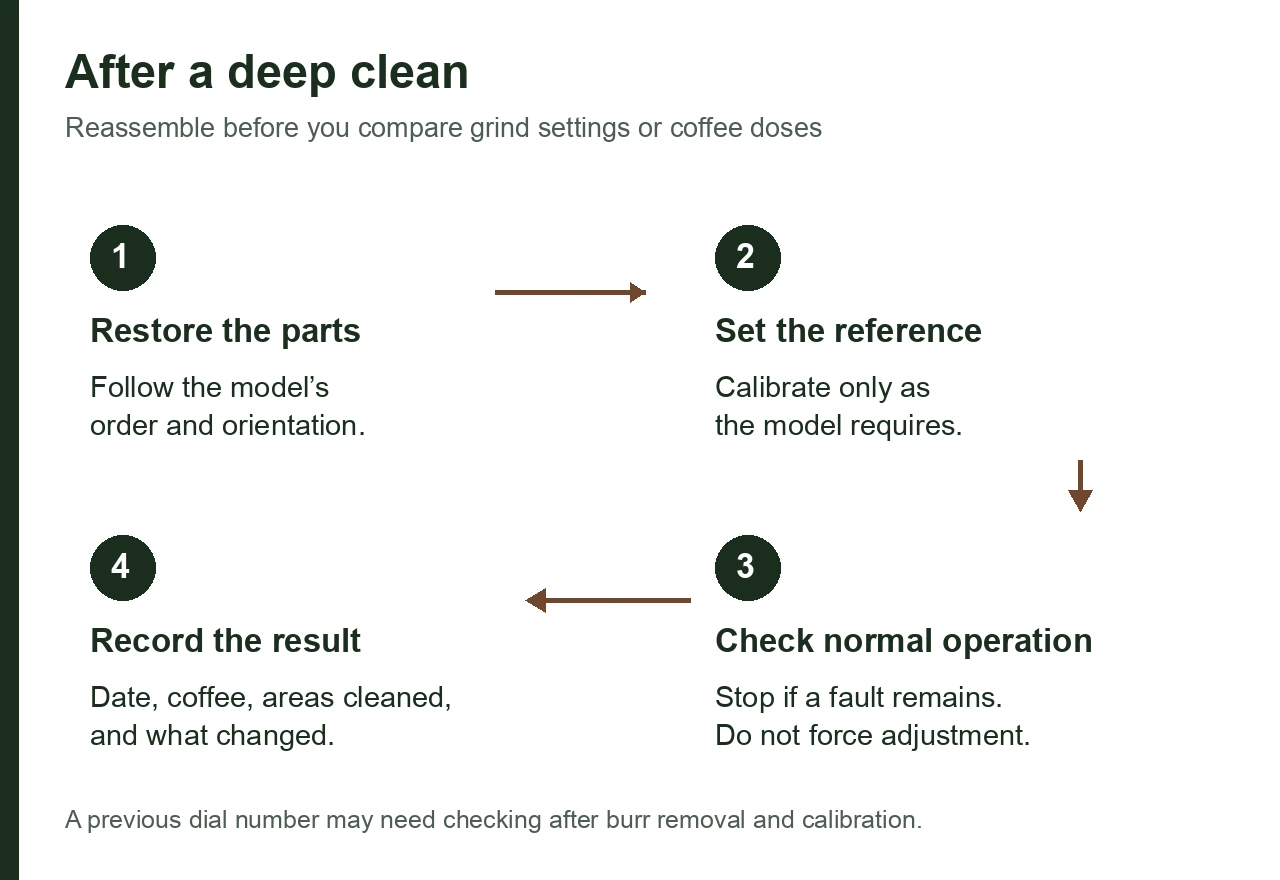
Niche recommends recalibration after cleaning and reassembly. Breville’s Barista Pro cleaning tutorial specifies the order for reinstalling its burr, hopper and lid. For a Baratza, use the instructions for the exact grinder; its general guide distinguishes Sette burr access from other models.
The first post-clean dose is not the right moment to compare an old dial number blindly. A burr carrier that was removed and reinstalled can change the reference point slightly.
If the grinder cannot reach its previous range after correct reassembly, stop and check calibration before assuming the burrs are worn.
How often should a single-dose grinder be cleaned?
Single dosing reduces the amount of coffee stored in a hopper, but it does not make the grinding chamber self-cleaning.
Niche’s Zero guide opens with monthly care, then gives more specific intervals for the deep clean it describes: every 2–3 months for standard home use, or monthly when a household averages more than three cups a day. It advises cleaning more frequently with oily dark roasts and brushing loose grounds between deep cleans. Niche also says to recalibrate after cleaning and reassembly.
For a different single-dose grinder, follow that model’s own instructions. Bellows, declumpers and ionizers do not remove the need to clean the grinding chamber.
A practical maintenance log
A simple record is more useful than guessing when you last cleaned the grinder.
| What to log | What to write down | Why it helps |
|---|---|---|
| Date | The day you cleaned | Builds your own interval history |
| Coffee / roast | Roast level and whether beans were visibly oily | Helps explain faster buildup |
| Approx. use | Doses or drinks per day | Separates calendar time from workload |
| Areas cleaned | Hopper, user-serviceable burr area, chamber, chute | Makes repeat sessions comparable |
| Symptom before cleaning | Slower grinding, residue, noise, stiff adjustment, or no symptom | Shows whether cleaning was scheduled or symptom-driven |
| Result afterward | No change / improvement / problem remains | Tells you whether cleaning actually addressed the symptom |
Use the record to check whether buildup appears before the next scheduled clean. If a symptom remains, share the model, coffee, cleaning steps and result with the manufacturer’s support team.
Questions about cleaning burr grinders
Is once a month too often?
Not for many home grinders. Baratza currently recommends 4–6 week routine cleaning, and Breville uses monthly as a general burr-grinder baseline. Follow your manual if it specifies another interval.
Should I clean the grinder every time I switch beans?
A full deep clean is usually unnecessary for every bean change. If carryover matters, use the manufacturer’s purge or switching guidance and reserve deep cleaning for the maintenance interval or when buildup is visible.
Can I vacuum inside a grinder?
Some manufacturers permit it with specific cautions. Niche’s Zero guide permits vacuuming during a deep clean after removing the springs from the burr housing, so they cannot be sucked up. Replace them during reassembly. That is a model-specific instruction, not a universal permission.
Can old coffee damage a grinder?
Residue can contribute to clogs, especially with oily coffee or very fine settings. Baratza warns that compacted coffee can damage internal components if a clog is allowed to build.
Do new burrs need cleaning before use?
Follow the manufacturer’s installation instructions. Do not wash burrs unless the manufacturer explicitly says to. New or replaced burrs may also require recalibration and a dialing-in period.
Related HomeBaristaMods guides
- When should you replace grinder burrs?
- Niche Zero calibration after cleaning
- Coffee grinder retention explained
- Maintenance library
References