
Diagnose your espresso machine by symptom.
Start with what the machine actually does, not a guessed failed part. Pick the exact platform, record the symptom, and use the linked guide for the next safe check.

Observation before diagnosis.

Exact machine
Record: Model code, market/voltage, and generation where it matters.
Why: Similar-looking machines can use different water paths, controls and service procedures.
What still works?
Observe: Group flow, hot-water flow, steam, pump sound, lights/display, and whether the symptom is hot-only or cold-only.
Why: Separating working functions is more useful than naming a failed component too early.
What changed immediately before?
Record: Cleaning, descaling, empty tank, new beans, grinder change, recent repair, transport, or modification.
Why: The event before the symptom often decides the safest first check.
Stop conditions
Stop: Repeated GFCI/RCD trips, exposed mains, smoke, a hot pressurized leak, wet electronics, or a machine that cannot be matched to the guide.
Next step: Use manufacturer or qualified service rather than live electrical probing or pressure disassembly.
Six platforms, one symptom router.
Water path, steam path or visible symptom first.

No water from the group head
Observe: Does the pump run? Does water come from the steam/hot-water path? Did the symptom follow an empty tank, descale, or storage?
Next step: Use the no-water flow tree before removing a pump or solenoid.
Pump is loud but no water flows
Observe: Confirm tank seating and whether the system recently ran dry.
Next step: Follow the priming-first guide before treating noise as proof of a dead pump.
Suspected solenoid blockage
Observe: Compare the group path with the other water paths instead of assuming the valve is blocked.
Next step: Use the flow test before removing the solenoid.
Weak steam
Observe: Tip cleanliness, steam flow, heat-up state, priming history and whether the valve leaks when closed.
Next step: Separate a blocked tip or workflow problem from valve/heat problems.
Black flakes or unusual debris
Observe: Machine generation, debris appearance, water history and whether material returns after normal cleaning.
Next step: Use the dedicated scale/coating/corrosion decision guide rather than naming the cause from color alone.
Shower screen clogs after every shot
Observe: Dose/headspace, basket fill, puck contact and whether buildup returns after normal cleaning.
Next step: Separate puck/headspace causes from a dirty or damaged screen before replacing parts.
Refill, flow, steam and electrical symptoms are separate.

No water from the group head
Observe: Tank level/seating, recent steaming, pump sound, and whether water exits the steam/hot-water path.
Next step: Use the tank/refill/pump/solenoid sequence before replacing a component.
Weak steam
Observe: Start with the tip and steam path before blaming the thermostat or boiler.
Next step: Follow the current weak-steam checklist.
After steaming, the boiler may need refill
Observe: What mode was used, whether water was dispensed afterward, and the exact Silvia manual procedure for your version.
Next step: Use the current manual-based refill sequence.
Steam wand drips when closed
Observe: Confirm the drip is from the steam wand and note whether it changes hot vs cold.
Next step: Use the steam-valve diagnosis before assuming a specific seal or part.
GFCI / RCD trips
Observe: When it trips: immediately, during heat-up, when the pump starts, or after a leak.
Next step: Stop repeated resets. Keep the machine unplugged and use qualified electrical diagnosis; do not probe live mains from a web checklist.
Brew water reads only 60–70°C
Observe: Measurement method, probe location, warm-up state and whether the machine behaves normally otherwise.
Next step: Rule out a bad temperature test before diagnosing a thermostat.
Basket, grinder, priming and fault-state questions stay separate.

Shot runs too fast or behaves differently after changing baskets
Observe: Pressurized vs non-pressurized basket, dose, grinder capability and whether the change started with new coffee or a new basket.
Next step: Use the Dedica guide to separate basket/grinder workflow from a machine fault.
No water after an empty tank or setup change
Observe: Tank seating, pump behavior, whether the steam/hot-water path flows and what happened immediately before the symptom.
Next step: Follow the current DeLonghi setup/priming path; do not repeatedly run a dry pump.
Steam texture is poor
Observe: Wand/tip cleanliness, steam output and the exact stock wand system before considering a modification.
Next step: Use the Dedica guide for workflow and model-specific modification boundaries.
Lights show an unfamiliar state
Observe: Record the exact light pattern and operating state instead of translating it directly into a component failure.
Next step: Compare the exact state with current DeLonghi documentation/support.
Pressure is a result of resistance, lever force and the gauge path.

Pressure is too high or too low
Observe: Grind, dose, puck prep, flow and lever force before treating the gauge number as a machine fault.
Next step: Adjust resistance systematically.
Gauge does not move
Observe: Separate “no pressure is being generated” from “pressure exists but the gauge path is not reporting it.”
Next step: Use the gauge-specific decision tree.
Shot runs too fast
Observe: Grind and puck resistance before adding more coffee by default.
Next step: Use the repeatable fast-shot correction sequence.
Temperature / preheat question
Observe: Exact Flair 58-family version and its preheat hardware.
Next step: Use the version-aware preheat guide rather than a universal temperature rule.
The exact Anna before the fix.
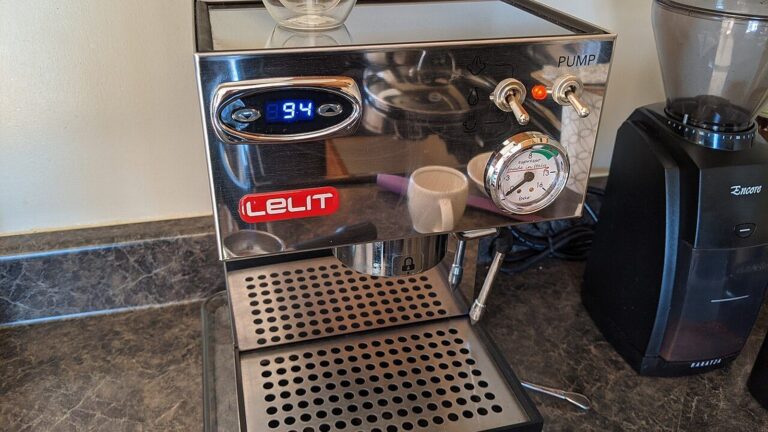
Shot sprays, channels or changes after a basket swap
Observe: Exact Anna model, LELIT57 basket fit, dose, grind and puck prep.
Next step: Use the model-specific Anna guide before changing pressure or buying a different basket.
Open the Lelit Anna guide →
Lelit Anna pressure gauge readings →
Weak steam
Observe: Exact model/control package, tip cleanliness and steam behavior.
Next step: Avoid assuming one steam-tip upgrade fits every Anna variant.
PID display does not match your expected brew behavior
Observe: Exact model, current PID settings and what measurement you are comparing against.
Next step: Use the Anna guide; do not turn one display number into a universal offset diagnosis.
Scale / maintenance question
Observe: Water treatment, exact machine documentation and the maintenance actually completed.
Next step: Use model guidance and the maintenance hub rather than a fixed every-three-month schedule.
Route by exact platform: Bambino, Barista or Dual Boiler.

Espresso only drips or will not flow
Observe: Grind, dose, basket state and whether water flows without coffee.
Next step: Separate puck resistance from a blockage before opening the machine.
Pump is loud but no water comes out
Observe: Tank seating, recent empty-tank event and which water paths still work.
Next step: Use the water-path checklist before replacing the pump.
Barista Express CLEAN / DESCALE light
Observe: Flashing vs solid state and the exact regional model/manual.
Next step: Use the light-state guide before starting the wrong cleaning cycle.
Bambino has no steam
Observe: BES450 vs Bambino Plus BES500, steam behavior and what other functions still work.
Next step: Use the model-split troubleshooting page.
Bambino portafilter is hard to lock
Observe: Dose, basket depth, puck height, gasket condition and whether the difficulty exists with an empty basket.
Next step: Check fit before forcing the handle.
Need the platform overview first?
Observe: Dual Boiler, Barista Express and Bambino are different platforms with different groups and control systems.
Next step: Start at the Breville / Sage hub when the machine family is not yet clear.
 Still unclear?
Symptom, model and evidence together.
If none of the routes match, write down the exact model and what still works, then send it to us or continue through the Guides Library, Reference Library or machine hub. One symptom is rarely enough evidence to name one failed component.